Home & Office
Desk Air Purifier for Home Office and Small Rooms
How to choose a compact desk air purifier for a home office, bedroom, or small room up to about 100 sq ft, with placement and routine tips.
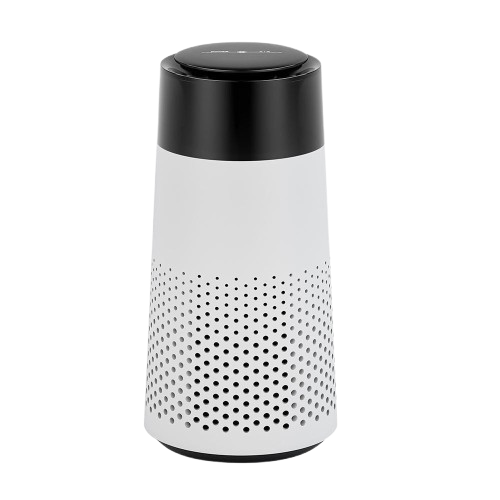
Working from a desk all day means spending long stretches of time in one small, often closed-off space — a home office, a spare bedroom, a dorm room, or a corner of an apartment with the door shut for quiet. Unlike a living room or kitchen with regular foot traffic and open doorways, a dedicated workspace can go hours without any real air exchange, especially if the window stays closed for noise, weather, or temperature control.
This guide covers what actually matters when choosing a desk air purifier, how a small-room purifier differs from a whole-house unit, and how a compact, USB-powered option like the PureCabin™ FreshDrive can fit naturally into a home office setup without adding clutter, noise, or complexity to your workday.
Why small, enclosed workspaces feel stuffy
A home office is usually smaller than the rooms it was carved out of — a corner of a bedroom, a converted closet, or a small spare room. Smaller air volume means any dust, paper particles, or lingering smells from a nearby kitchen or a pet in the house have less room to dilute into, so the space can feel "close" faster than a larger, more open room would.
Closed doors also matter. Many people keep an office door shut during calls or focused work, which is great for noise control but removes one of the easiest sources of passive ventilation. Add a space heater or portable AC unit running in a tight loop, and the room can end up recirculating the same air for hours at a stretch, similar to a car cabin with the windows up.
What makes a good desk air purifier
1. A genuinely compact footprint
Desk space is valuable. A purifier that takes up as much room as a monitor stand defeats the purpose. Look for a unit that can sit next to a laptop, keyboard, or desk lamp without crowding your workspace — something closer to the size of a large mug than a small appliance.
2. Quiet enough for calls and focused work
This is arguably the single most important spec for a desk purifier. A unit humming away six inches from your microphone will be picked up on video calls and can be distracting during deep-focus work. FreshDrive is built to run below 36dB, which is designed to sit comfortably in the background of a quiet room without competing with conversation or concentration.
3. USB power that matches how desks already work
Desks are already full of USB-powered devices — monitors, hubs, chargers, lamps. A purifier that plugs into any spare USB port or power bank fits naturally into that setup, without needing a dedicated wall outlet or a separate battery to keep charged.
4. Simple, one-touch operation
You should not need an app, a remote, or a multi-page manual to turn on a desk purifier. A single touch-control button that starts and stops the unit is far more practical for a workspace where you are focused on other things most of the day.
5. Coverage that matches a small room, not a whole floor
Desk purifiers are designed for personal, near-body use in small spaces — typically up to around 10m², or roughly 100 square feet, which covers most home offices, dorm rooms, and small bedrooms. Do not expect a compact unit to treat an open-plan living area or a large multi-room floor; that is a different category of product entirely.
Desk purifier vs. whole-room purifier
Whole-room purifiers are larger, often mains-powered, and designed to cycle the full air volume of a bigger space multiple times per hour. They typically sit on the floor, need more clearance around their intake and exhaust, and are not meant to move between rooms frequently. A desk purifier like FreshDrive takes a different approach: it focuses on the immediate personal space around where you sit, is small enough to relocate in seconds, and is powered by whatever USB port or power bank happens to be nearby. Neither approach is inherently better — they serve different needs. For a single desk or small room, a compact personal-space purifier is usually the more practical and cost-effective choice.
Signs your home office could use more airflow
A workspace that has gone too long without fresh air often gives off a few noticeable cues: the room feels warmer or more humid than the rest of the house even with the same thermostat setting, a faint "closed room" smell is noticeable when you first walk in after being away for a few hours, or focus and energy seem to dip during long stretches of back-to-back calls in the same closed room. None of these are medical symptoms — they are ordinary indicators that a small space has not exchanged air with the rest of the house in a while, and they usually respond well to a few minutes of ventilation.
How often to clean a small home workspace
A desk and the surrounding small room accumulate dust faster than people expect, partly because electronics like laptops and monitors generate a small amount of static that attracts airborne particles. A reasonable routine is a quick wipe-down of the desk surface every few days, a more thorough dusting of shelves, cable trays, and equipment weekly, and a full vacuum of the floor and any rugs on a weekly or biweekly basis depending on foot traffic. If the room also doubles as a guest space or storage area, closets and shelves are worth checking periodically too, since closed storage can trap dust and stale air just as easily as the main room.
Setting up a workspace that stays fresher longer
A few structural choices can reduce how often a home office feels stuffy in the first place. Positioning a desk near a window, even if it stays closed most of the day, makes it easier to remember to open it briefly between meetings. Keeping a small trash bin with a lid reduces lingering food odors from wrappers or coffee cups left overnight. Choosing washable or wipeable surfaces for chair fabric and desk mats makes routine cleaning faster, which in turn makes it more likely to actually happen on a consistent schedule rather than being put off for weeks at a time.
Best practices for a fresher home office
Even the best purifier works better alongside good room habits. Open the door or a window for a few minutes between calls when possible. Keep food and drinks off the desk when you can, since spills and crumbs are common contributors to a stale-smelling workspace. Dust shelves, cable trays, and the tops of monitors regularly — dust that settles on equipment can circulate back into the air whenever a fan or vent disturbs it. Vacuum or sweep the floor on a regular schedule, especially under the desk where crumbs and dust tend to collect unnoticed.
How FreshDrive fits a home office setup
The PureCabin™ FreshDrive was originally designed around car cabins, which share a lot in common with a small home office: both are compact, mostly enclosed, and used for long stretches at a time. That makes it a natural fit for a desk as well. It uses negative-ion technology and a composite filter, moves air at roughly 50m³/h, runs below 36dB, and is rated for spaces up to about 10m². Touch controls mean you can start it with one tap before a morning of calls, and its ABS body is available in four variants — White, Black, White Pro, and Black Pro — each at $24.99 USD with free shipping, so it can match a light or dark desk setup.
FreshDrive is intended to help freshen the enclosed air of a small room as part of a broader routine that includes ventilation and cleaning — it is not positioned as a medical device and does not make claims about treating allergies, illness, or respiratory conditions.
Placement tips at a desk
- Place the unit on a stable, flat surface away from paper stacks or spill-prone areas.
- Keep air openings clear of books, monitor stands, or cable clutter.
- Route the USB cable away from where it could be pulled or tripped over.
- Position it within arm's reach so the one-touch control is easy to use.
- Avoid placing it directly against a wall or enclosed shelf that could block airflow.
Sharing a workspace with pets or roommates
Home offices are rarely used in total isolation from the rest of the house. A cat that likes to nap on the desk chair, a dog that wanders in during calls, or a roommate who occasionally works from the same small room all add their own contribution to the air in a shared space. Regular vacuuming of any fabric surfaces, keeping pet bedding out of the immediate desk area, and brief ventilation after a pet has been in the room for an extended period are simple habits that reduce how much a shared workspace depends on any single piece of equipment to stay comfortable.
Traveling with a desk purifier
Because FreshDrive is compact and USB powered, some remote workers bring it along when working from a co-working space, a hotel room on a business trip, or a relative's house for an extended stay. It fits easily into a laptop bag alongside a charger and cable, and it does not require any setup beyond plugging it into a nearby USB port. This portability is one of the more practical advantages of a personal-space purifier over a larger, stationary unit that is designed to stay in one room.
Frequently asked questions
Can a desk purifier replace opening a window?
No. A compact purifier is meant to complement ventilation, not replace it. Opening a door or window periodically is still the most direct way to exchange stale air for fresh air.
Is it safe to run all day while working?
A low-power USB purifier like FreshDrive is designed for continuous daily use. Always follow the included user manual and keep the unit's air openings unobstructed.
Will it help with a room that smells like cooking from nearby?
It may help freshen the enclosed air in your immediate workspace, but the most effective fix for cooking odors drifting into a room is closing the door during cooking and ventilating the kitchen directly at the source.
A comfortable home office is mostly about small, consistent habits — brief ventilation breaks, regular dusting, and keeping food and clutter off the desk — with a compact purifier as a helpful daily-use layer on top. For more practical guides, visit our blog, check the FreshDrive FAQ for specific questions about power, noise, and coverage, and review our shipping policy and refund policy before ordering. You can reach our team through the contact page or learn more on our about page.
This article provides general product and workspace-comfort information. It does not provide medical advice, and a portable air purifier does not replace ventilation, cleaning, or professional advice for persistent air-quality concerns.
PureCabin FreshDrive
Fresher cabin air from $24.99
USB-powered · Quiet under 36dB · Free shipping · Secure Stripe checkout